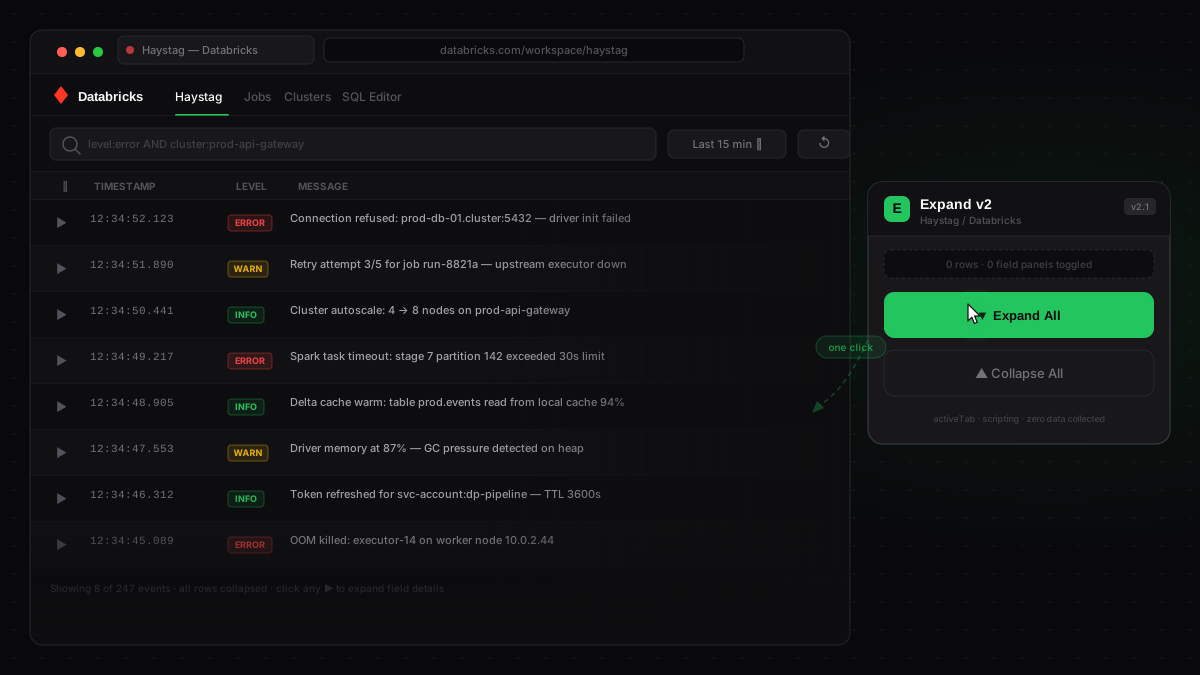
The Problem
Every debugging session in Haystag starts the same way: scan through log events, find a few that look relevant, and click the expand arrow on each one to see the full field details.
That’s fine for two or three entries. But in practice — during an incident, a slow job investigation, or routine log review — you’re opening 15, 20, sometimes 50 rows in a session. Each one needs its own click. Then you collapse them all and scan again. It’s the most mindless part of log analysis, and it compounds over time.
Haystag has no built-in “expand all” control. This gap costs real time, especially during active incidents when every second matters.
The Thinking Process
This task had all the characteristics of something worth automating:
- Repetitive — the exact same click sequence, every single session
- Zero cognitive value — expanding a row takes no judgment, just a mouse movement and a click
- Blocking — you can’t analyze the data until you’ve opened the rows you care about
The technical path was clear: Haystag already renders all rows in the DOM, with expand/collapse controlled by click handlers on toggle buttons. A content script that queries those buttons and fires .click() on each one would do the job in milliseconds — no UI modification, no API calls, nothing fragile.
The decision to build this as a Chrome extension rather than a bookmarklet came down to portability and UX. An extension popup is always one click away, works across every Haystag tab without any setup, and shows immediate feedback confirming the operation ran.
The Solution
Expand v2 adds a small toolbar popup to any Haystag tab. Two buttons, nothing else:
- Expand All — opens every event row and field-details panel on the page instantly
- Collapse All — closes everything in one shot
The popup also shows a count of how many items were toggled — so you know exactly what ran. No configuration, no background processes, no data leaves the browser.
What used to be 20–50 repetitive clicks is now one.
Technical Notes
The extension is built on Chrome Manifest V3 — the current standard that replaces the deprecated MV2. Permissions are minimal: activeTab and scripting. No broad host permissions, no persistent service worker, nothing that would raise flags in a security review.
The “v2” in the name marks a full rewrite of an earlier MV2 version. Chrome began phasing out MV2 extensions in 2024, so the extension was rebuilt from scratch to comply with MV3’s stricter execution model — the core idea stayed exactly the same.